http://news.cnet.com/8301-13554_3-10047186-33.html?tag=mncol
This article relates how just like the internet does not know who you are, instant messages supposedly coming from your friends may instead be coming from malicious software running on their computers. It also indicates that skepticism may be your best defense.
Sunday, September 28, 2008

Blackberrys Blamed for Ruined Vacations/Sick Days
It looks like the many people addicted to checking their blackberrys have a love-hate relationship with them. I used to support the blackberrys used in my workplace, and I can tell you that many people never leave home without them regardless of whether they were on vacation.
Blackberry and the Workaholic
Blackberry and the Workaholic
Tuesday, September 23, 2008
And Now Comes Windows 7...
Just when you thought you were getting used to the issues with Windows Vista, the beta version of Windows 7 will soon be coming out.
The New Windows 7 Operating System
The New Windows 7 Operating System
Macintosh Computers in a law Firm
Macintosh Computers in a Law Firm
by David Weikert
Washington Apple Pi Journal, May/June 2001, pp. 29-36, reprint information
You can see the Bondi Blue iMac peeking over the stylish reception counter. Cedon is busy answering incoming calls. Both Apple Computer and the Blumenfeld & Cohen Technology Law Group where I work, nurture a profound sense of design and style. Striking Apple designs include the iMac, iBook, PowerBook G3, the G4 Cube and the G3 and G4 Minitowers. The recent Macintosh computers, especially the iMacs and PowerBooks, complement our office design with their own peerless style. The offices will even look better as we take delivery of the G4 Cube and G4 Minitowers and Titanium PowerBook recently ordered.
Lobby and Reception Area
Blumenfeld & Cohen's style is evidenced in the light, airy design, individual office layouts, color schemes, furnishings and a few, well placed curvilinear walls. Following figures exemplify some of our more contemporary, outstanding design aspects.
The main access for clients and visitors is through the lobby and reception area. Three additional entrances lead directly to corridors that conveniently access individual offices and conference rooms.
Partners' offices include couches and overstuffed chairs as well as guest chairs and a table. The left edge of a workstation is visible at the right edge of the photo.
Typical Partner's Office
All Partners occupy offices overlooking Massachusetts Avenue. The contemporary work station furniture is fabricated from a light colored birch wood. The Attorney's offices have similar tables, guest chairs and workstation furniture as those found in the Partner's offices. They also occupy exterior offices with a view of the Washington skyline. Paralegal and other support staff are housed in interior offices; most of which are equipped as single workstations.
The first door on the left leads to the copy and supply area and the glassed grid area on the left leads to the kitchen and eating area. Doors on the right hand side of the tunnel lead to supply and file areas. Delivery Tunnel
A "Delivery Tunnel" permits outside deliveries of mail, packages and supplies to the Administrative Support and Copier room and Central Files room without disrupting workspace corridor traffic. The tunnel also leads to a kitchen and seating area for sit-down lunches and for the monthly birthday parties.
This is one of the conference rooms we use for clients and visitors. One slot in the table covers seven 10/100BaseT Ethernet ports connected to our LAN. The other slot covers two 4-plug power strips. Conference Room
There are three conference spaces for meetings and conference calls. The largest room can be subdivided with a built in, folding partition to create two rooms. Each conference room is equipped with 10/100BaseT Ethernet ports and power receptacles on sidewalls and in the floor.
What? You Use Macs?
Believe it or not, computers from the dark side are almost nonexistent at Blumenfeld & Cohen's, Washington, DC office. We have two PCs for the accounting department and a general utility PC for some other functions, which I will address later. All the other computers are Macs.
However, the San Francisco office, which is about a third of our size, only uses PCs and the OS from the Evil Empire. We installed our LAN and integrated with the Internet over a year ago. The San Francisco office is just now completing their LAN and their integration with the Internet. Could the reason be that they use PCs, Windows and a Windows NT server? One wonders...
With computers from the dark side so prevalent in most legal and business offices, how can Blumenfeld & Cohen's, Washington, DC office survive and even flourish with Macs? There are a number of reasons for this:
The two senior partners like and support Macs without any reservations, having experienced problems early on with PCs when the firm started, especially trying to multitask under early Windows versions.
We choose to use software that produces document file formats and functions that are interoperable between Macs and PCs.
A significant amount of our legal research is performed using a Web browser and that usually makes little difference whether used on a Mac or a PC.
The Macs require less cost and time to maintain and support than the PCs.
Macs have a number of functions not available on the PCs such as the Location Manager; critical to supporting attorneys on our LAN, on travel and at home.
The User Interface for the Finder and all applications is consistent when developers follow Apple's guidelines; Microsoft apparently does not follow guidelines because each application in the Microsoft Office suite uses different conventions.
The Macs, except for use of a two button mouse for Contextual Menus, are easier to use and more productive than the PCs.
The Macs have a longer useful life than the PCs. We still use some G3 accelerated Macs that were manufactured as long ago as five years.
There are other lesser reasons for our using Macs but the most important are listed above.
What Software Do You Use?
A screen capture of my Desktop. Note the accessibility of applications under the Apple menu in the upper left and the DragStrip along bottom left. The right side shows the mounted, shared folders (the ones with the "tail"), Desktop Printers, folders and hard disk.
Each Macintosh is running either Macintosh OS 8.6 or Macintosh OS 9.0.4 and is configured with a standard set of applications and utilities. The standardized configuration makes it easy to create a master disk image for installation on all computers. It also standardizes each computer so users and system administrators can operate any Mac without having to adjust for differences or fumble around to find something that they know should be installed.
Under the Apple Menu, we have created an Applications folder, a Communications folder, Utilities folder and an Apple Menu items folder that collects the Apple System Profiler, Calculator, Key Caps, Scrapbook and Stickies. The Chooser, Control Panels folder, Sherlock and Network Browser are all directly accessible under the Apple Menu and not in any folder. In addition, the use of leading spaces and the degree sign force the Menu items and folders into a preselected order.
The Applications folder contains aliases to AppleWorks, BBEdit Lite, Brief Encounter, FileMaker, Microsoft Office and Word Perfect.
Adobe Acrobat Reader, Mail Siphon II, Netscape Communicator, ZTerm and three specialized legal research applications, Premise, Westlaw and LEXIS/NEXUS, have aliases in the Communications folder. We use Netscape Communicator for e-mail rather than a dedicated client such as Eudora.
The Utility folder includes aliases to DropStuff, DragStrip, MacLink, GraphicConverter, Norton AntiVirus and Stuffit Expander.
Except for the Systems folder, the Apple folders are moved to a folder positioned at the bottom of the "list view windows" to reduce clutter. That includes the Apple Applications folder, the Internet folder, the Utilities folder and other Apple goodies.
The applications and utilities under the Apple Menu are duplicated on a single click Launch Bar. We use DragStrip rather than the Apple supplied Launcher to control icon size, bar position and application positions inside the strip. Some of our users prefer to use the Apple Menu to launch applications and some prefer the DragStrip so we provide both on all setups.
What Software Do You Use Most Often?
Our primary general office software is Microsoft Office 8.0. We use Word heavily, Excel moderately and PowerPoint occasionally. Any document we receive can either be read or modified in Word 8.0 or translated with MacLink into Word 8.0 documents. Since many other law offices use Microsoft Office on their PCs, the advantage of a compatible file format and function makes it easy on both them and us.
Brief Encounter is a legal time and expense recording program used in conjunction with Brief Accounting for billing clients. When connected to the LAN, Brief Encounter requests updated information such as labor category rates, matters (client jobs) from the Brief Accounting server and reports accumulated time and expense data. Brief Encounter can be used even when not connected to the LAN. Attorneys that are on travel can e-mail time and expense reports in a format that can be imported into the Brief Accounting server. Brief Encounter has a multi event timer so those attorneys can track how much time they spend on all matters. Obviously, Brief Encounter is used daily.
Netscape Communicator, often in conjunction with Acrobat Reader, is used daily for Web research and for e-mail. Premise, Westlaw and LEXIS/NEXUS are used by the attorneys and by the paralegal staff when performing research for the attorneys although the paralegal staff are using the Web-based versions more and more instead of the dedicated applications.
Mail Siphon II is particularly useful for our Road Warriors (attorneys on travel and limited to a dial up modem connection). Mail Siphon retrieves the titles and first 30 or so lines of all of the messages on the Mail Server. Since the mail is not downloaded but just displayed, the attorney can see what messages exist much more quickly than if they were downloaded. You can reply to any message seen in Mail Siphon and Mail Siphon also lets you delete mail you do not wish to download such as SPAM or UCE. Attorneys often send each other messages with large attachments (500 Kbytes to 2000 Kbytes). Try downloading a 2-Megabyte file over a 56K modem that often operates at much less than 56K and you can readily see the worth of Mail Siphon while on dial-up.
All Attorneys use Palm Organizers and the Palm Desktop application is installed on all Attorneys' Macs for daily use. The Palm Desktop application and Palm Organizer are synchronized so information entered in either is available on both. Support staff installations include Claris Organizer, which was used as the model by 3COM to program the Palm Desktop application.
All of the PowerBooks have multiple configurations controlled by the Macintosh OS Location Manager. These include a setup for each of the following:
TCP/IP for the office LAN with static IP address
TCP/IP for a generic LAN with DHCP
TCP/IP for home use with DSL or Cable
Remote Access and PPP dial up via modem for travel or home use.
The user selects the appropriate configuration during an early step in the OS startup. Try changing configurations in a reasonable time on a PC running Windows and it is immediately obvious why the Mac OS is superior.
The utility software most used is Stuffit Expander and MacLink.
What Else Do You Use?
BBEdit Lite, AppleWorks and FileMaker Pro are used only occasionally by only a few staff and by the System Administrators, who maintain a database, create drawings and clean up garbled text.
We sometimes receive Word Perfect documents, usually from government offices that are still using that legacy word processor. These documents are translated into Word format with MacLink or, if there are format problems, opened directly in Word Perfect which is installed on all Macs.
Since vandals don't seem to write too many dedicated viruses for Macs, Norton AntiVirus is mostly used to find and remove viruses that come with PC, Word and Excel files, most of which are enabled by the Microsoft macro function. To further protect the Macs, we operate Word and Excel with Microsoft Active-X and macros disabled. GraphicConverter is used occasionally but mostly by the System Administrators when an attorney needs a file converted.
When troubleshooting suspected directory problems, Apple's Disk First Aid is used as a prelude to running Disk Warrior, our primary tool for correcting damage. Norton Utilities (Disk Doctor and Speed Disk) and TechTool Pro are also used if required. The System Administrators also use programs such as Mac TCP Watcher or AG Net Tools for checking the network and Apple Profile Manager and Newer Gauge suite for checking computer configuration and performance.
VirtualPC with Windows 98 is installed on a few computers that need that capability. Virtual PC is required to execute a run time version of a program called RecordMate, which is programmed in Microsoft Access. We could run RecordMate on a PC but the users primarily need programs that are part of our standard Mac setup. Why buy two different computers when one with emulation works well. Besides, we are stubbornly Mac centric where there is no advantage to switch.
We ran a PC program called TABS (Time And Billing System) under SoftWindows in DOS Mode before our recent change to Brief Encounter. While TABS is an excellent program, and has been available in a Windows version for years, our Mac-centric users were very unhappy with the slower speed and inconvenience of running the program under emulation, and the even slower speed of the Windows version running under emulation.
To properly evaluate that Brief Encounter and TABS generated identical billing data, we planned to use both during an overlapping two-month changeover. Results were so good at the end of the first month that we decided to stop using TABS and SoftWindows immediately. Everybody in the firm is pleased with the change to Brief Encounter.
Tell Me about Your Computers
A docked PowerBook with monitor, keyboard and mouse. The Palm cradle, hub and USB drive were not connected at the time this picture was taken.
All attorneys have 1999 (Lombard) or 2000 (Pismo) PowerBook G3s equipped with 128 or 192 MB of RAM. They all have Bookendz docking stations on their desktops connected to a 17-inch monitor and a 4-port or 7-port USB hub that connects to a full size keyboard, a one or two button mouse, Palm Organizer cradle and external USB floppy or ZIP drives. The PowerBooks then become the primary computer for attorneys whether at their desks or on travel. This bypasses the problem of synchronizing desktop and laptop computers.
We also ordered our first 2001 Titanium PowerBook (Ti Book) with 500 MHz G4 processor and 256 MB RAM for delivery in March 2001. The larger screen size coupled with lighter weight lead us to believe that the Ti Book will be popular with our attorneys. A vendor has already announced they are designing a docking station for manufacture and all other necessary peripherals for docking already exist.
The Paralegal staff uses beige G3s with 128 MB of RAM although their G3s will be replaced with G4 Minitowers in March 2001. Our Office Administrator also uses a beige G3, which will be similarly replaced by a G4 Cube at the same time.
The remaining administrative support staff use PowerMac 7500s upgraded with a Newer (R.I.P.) G3 Accelerator Card. This gives a CPU speed somewhat faster than the beige G3s but the native PowerMac 7500 memory access and hard drive access are slower. Thus PowerMac 7500s are not quite as capable as our 266 MHz CPU G3s. Overall, the PowerMac 7500 computers perform quite well for four to five year old computers. We have had only two failures since they were purchased and that was a power switch on one and a CD ROM drive on another. However, the PowerMac 7500s, even with G3 Accelerator Cards, are reaching the limit of their usefulness. They mostly have 2-GB SCSI hard drives and many have less than ten-percent free space. SCSI drives cost more than ATA drives used in later computers. It is not attractive to replace the SCSI drives with larger ones considering the computers age and other limitations. We are eagerly waiting for Apple to release a low cost G4 Cube priced similarly to the middle iMac level or an iMac with a 17-inch monitor. If either happens, we will start to selectively replace the 7500s.
The Research Library includes reference material and computers that access the Internet. The PowerCenter Mac clone at the right side of the iMacs will be replaced by an iMac. Note the niche the research library computer area occupies formed by a cutout of the curvilinear interior wall. Our administrative assistant and the receptionist use iMacs. There are also two iMacs in the Research Library for use in research and an additional one is on order.
The Research Library
The two System Administrators have beige G3s and there are no current plans to replace either the System Administrators or the G3s ;-).
By the way, the accountings PCs manufactured by Compaq are called iPaqs and use the Windows 2000 Professional OS. These cute little buggers have the same Universal Serial Bus (USB) interface as recent Macintosh computers and no parallel or serial ports. They are much more cheaply made than the iMac and have nothing of the iMac style, however the accountants are happy to have them instead of their three year old PCs.
Star Wars Robot or iPaq?
The iPaq and monitor with the silver and black motif, the only selection available.
We use a three-year-old PC running Windows 2000 Professional primarily for two things. It is useful for running .exe files that may for some reason not run well under VirtualPC. The PC is also imperative for translating mail that we sometimes receive in the Microsoft Outlook unique mail format instead of the "open standards" that Microsoft claims to support. Message in this format can be forwarded to a mailbox named "outlookrepair" and retrieved from the PC using Microsoft Outlook.
The LAN
Our office LAN is fully networked and connected to the Internet through a high speed DSL line from Rhythms NetConnections that is runs at 7.1 Megabits per second. Transfer rates on incoming mail are so fast, that our attorneys have observed that attachments often download faster than they can be opened by their applications. Our LAN is protected by a SonicWall Pro firewall similar to the one described by Lawrence Charters in a September/ October 1999 Journal article. Needless to say, we are protected from most attacks although a concentrated Denial of Service (DoS) could result from being bombarded from multiple computers simultaneously. The SonicWall log flags about 5 to 20 attempts a day to break into our LAN. To the best of my knowledge, none have been successful.
Obligatory network closet photo. The SonicWall also has a capability to do Virtual Private Networking (VPN). VPN opens a tunnel on the Internet and sends encoded data to another LAN that has VPN and has the correct password. Simply put, VPN works the same as having your own private Internet cable between two distant LANs. We will shortly link our Washington, DC and San Francisco offices with VPN so that we can directly exchange files, and print in each office from the other. Over time we expect to be able to do simultaneous document markup and video conferencing over the connection. Once linked, the San Francisco office can run their Brief Accounting client programs and access data from the Brief Accounting server in our office. The VPN interface between our LANs also permits update and reporting of Brief Encounter data from San Francisco with the Brief Accounting server.
Distribution of the LAN to individual offices is through 100BaseT Ethernet premise cables connected to five 24-port Bay Networks 10/100 auto sensing, auto negotiation switched hubs via patch panels. Each office has four jacks that permit flexibility of placement of the computers.
Six Hewlett Packard LaserJet printers (two -- 4MPlus, two -- 4000N and two -- 4050N) are accessible on the LAN from any Mac or PC. The printers are distributed around the primary corridor in dedicated print cubicles. The two LaserJet 4050N printers are addressed through a print queue running on the Blue and White G3 server. In addition to the networked printers, the Accounting iPaqs are each connected to a dedicated Brother 1250 Laser printer through a USB interface. The Brother 1250 Laser printers are located within each accountant's office to maintain control over sensitive information. We have a Color LaserJet 4550N on order for delivery in March 2001 along with a Hewlett Packard scanner with an Automatic Document Feeder (ADF).
Our Servers
We maintain a Blue and White G3 AppleShare IP (ASIP 6.2) file and print server which is backed up onto DDS 4 tapes every evening. Users are responsible for keeping files that they need to have backed up on their own folder on the server.
A beige G3 minitower hosts an SMTP mail server that processes only outgoing mail. We added this because our ISP outsources mail and the contractor limits attachment sizes to 5 MB. With our own server, we can send attachment without size limits.
The remaining server is another beige G3 minitower, which runs Brief Accounting, a law practice oriented, server based accounting system created by a small Canadian firm located in the suburbs of Vancouver. Brief Accounting is written in cross-platform Acius 4D server database and may be served on either Macs or PCs. The cross-platform Brief Accounting client software is also available for Macs and PCs. This is perfect for us because our two DC office accounting personnel have PCs, our Office Administrator has a Mac and the San Francisco office administrator/accountant has a PC. We have a single integrated accounting system but data elements such as clients and banks are different. However all of the differences are accommodated in the Brief Accounting server.
Two interesting side notes: The Brief Accounting and Brief Encounter developer, David Fisher-Fleming of Pan Pacific Professional, does all his development on Macs. He is also the original owner of a beautiful red MG TD roadster that looks immaculate. He flew down from Canada to install Brief Accounting and to teach our personnel how to use the program. It is unfortunate that Brief Accounting and its companion Brief Encounter are not better known as it is multi-platform and includes the functions of other PC only legal accounting systems. Brief Accounting information may be found at:
http://www.briefaccounting.com
The servers are arrayed on a LAN workstation so they may be easily accessed. The LAN workstation has rollers so it may be moved away from the wall to access the backs of the servers. On the bottom shelf, left, there are three APC UPS units and, on the right, three unassigned 7500/G3s.
And, of course, the link to David's MG TD:
http://www.briefaccounting.com/mg/dff.htm
The servers are centrally located in the System Administrator's office where they are directly accessible for monitoring and update.
We contract for our POP mail with Cedant. We get 75 "free" mailboxes with the amount of disk storage we require. Cedant has recently added a Web-based mail function, which we are currently investigating. There is no extra charge for the Web-based mail but most of the attorneys' mail must be downloaded to their computers anyway so this may be of limited use except while on travel.
Blumenfeld & Cohen were one of the first dozen or so law firms with a Web site, on line since 1995. Periodic design changes have been made as Internet standards have evolved. We are currently updating our site content and design so you may find that the site has changed substantially if you have previously visited us. Stop by for a visit and an expanded description of our firm.
Cedant hosts our Web site at:
<http://technologylaw.com>.
The Cedant network connection provides a bandwidth-on-demand connection with Frontier Global Center, a Tier 1 provider servicing such giants as Yahoo! Netscape, and USA TODAY. Cedant is linked to FGC by a fiber optical cable -- making it unnecessary to link to the Internet through an OC3 or T3 Telecom circuit... no telecom circuit means that downtime-causing circuit failure is virtually eliminated!
Network and System Support
When I started with Blumenfeld & Cohen, about two and a half years ago, the DC office was about one-third the size it is now, networked with AppleTalk and interfaced to the Internet via dial-up modems. At first, I worked on a part-time basis just two days a week, approximately six hours a day. By summer of 1999, my workload had grown to about three, six-hour days per week as we added personnel. Although the AppleTalk network was inadequate for our needs, we knew that we would soon move to a new office that we could configure to our specifications. As the firm grew, we relocated to the new office in late fall 1999. As planned, our new location included an Ethernet LAN and a high speed dedicated connection to the Internet.
The watchdog on top of the G4 cube keeps careful track of any interlopers that may steal inside to pine over the Cube. By this past summer, with the increase in personnel and System Administrator functions, I was working about 7 hours a day for four days a week and often needing to catch up on the weekend. I had to drop most of my other business clients because of the demands on my time. As a result of the increased workload and added personnel, we hired a full time System Administrator in November of 2000. This new position allowed me to keep the job in the family. My son Mark and several other candidates were interviewed and Mark was ultimately hired for the position. (No, I did not interview or hire him. ...Really! ...Honest!)
Mark has a good knowledge of Macs and much of the software having previously been a part-time System Administrator and full time graphic designer at a firm that publishes weekly housing journals. The attorneys like Mark as he is patient and shows none of the ego that often occurs in a position where nobody else can perform your job. I am instructing him to the best of my limited ability on the mail servers, firewall and the like. He has made some innovations and enhancements such as using disk images and AppleScript to create standard installs and has made other improvements. Mark is instructing me on the finer points of graphics programs.
Epilogue
Since this article was written, we have taken delivery of the G4 Cube, G4 Minitowers, iMacs, HP Color LaserJet 4550N, HP scanner with ADF and UPS s. We expect delivery of the Ti PowerBook within the next few days. I could not resist adding one more picture, the G4 Cube which is now configured and in use.
The Author
Dave Weikert is a part-time System Administrator and Consultant to Blumenfeld & Cohen. Dave designs and configures networks and Macintosh computers and provides installation, operational and maintenance support. Dave agrees that he is a Mac bigot and avoids PCs whenever possible.
The majority of Dave's knowledge derives from working on the Washington Apple Pi TCS Crew with the experts such as Jon Thomason, Lawrence Charters, Rick Zeman and Lou Dunham. He also has been a regular service provider at the Tuesday night Macintosh Clinics.
Mark Weikert, full time System Administrator with Blumenfeld & Cohen took and processed the digital pictures and his wife Michele edited and helped rewrite the final drafts.
Note: Dave Weikert passed away in May 2001, shortly after this article appeared in print. He battled a serious illness for several years with courage, determination and ingenuity, unwilling to allow illness to place limitations on his interests and passions. A Washington Apple Pi member from the very beginning, more than two decades ago, Dave served at one time or another in almost all officer and volunteer positions, helping grow the Pi from a small band of clever fanatics to a very large band of clever fanatics.
by David Weikert
Washington Apple Pi Journal, May/June 2001, pp. 29-36, reprint information
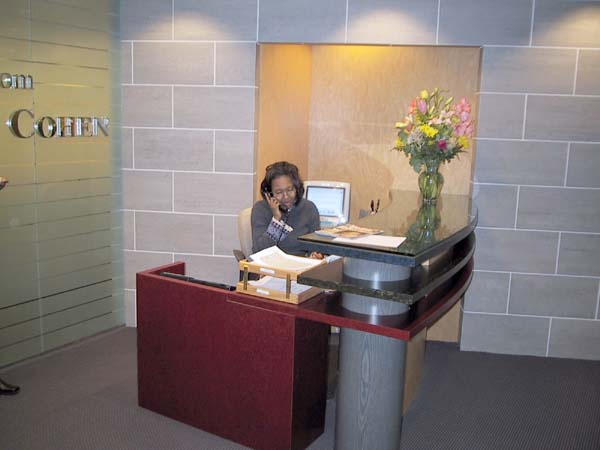
You can see the Bondi Blue iMac peeking over the stylish reception counter. Cedon is busy answering incoming calls. Both Apple Computer and the Blumenfeld & Cohen Technology Law Group where I work, nurture a profound sense of design and style. Striking Apple designs include the iMac, iBook, PowerBook G3, the G4 Cube and the G3 and G4 Minitowers. The recent Macintosh computers, especially the iMacs and PowerBooks, complement our office design with their own peerless style. The offices will even look better as we take delivery of the G4 Cube and G4 Minitowers and Titanium PowerBook recently ordered.
Lobby and Reception Area
Blumenfeld & Cohen's style is evidenced in the light, airy design, individual office layouts, color schemes, furnishings and a few, well placed curvilinear walls. Following figures exemplify some of our more contemporary, outstanding design aspects.
The main access for clients and visitors is through the lobby and reception area. Three additional entrances lead directly to corridors that conveniently access individual offices and conference rooms.
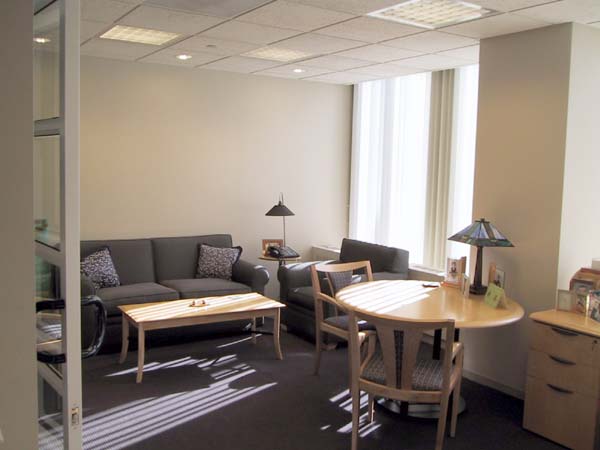
Partners' offices include couches and overstuffed chairs as well as guest chairs and a table. The left edge of a workstation is visible at the right edge of the photo.
Typical Partner's Office
All Partners occupy offices overlooking Massachusetts Avenue. The contemporary work station furniture is fabricated from a light colored birch wood. The Attorney's offices have similar tables, guest chairs and workstation furniture as those found in the Partner's offices. They also occupy exterior offices with a view of the Washington skyline. Paralegal and other support staff are housed in interior offices; most of which are equipped as single workstations.
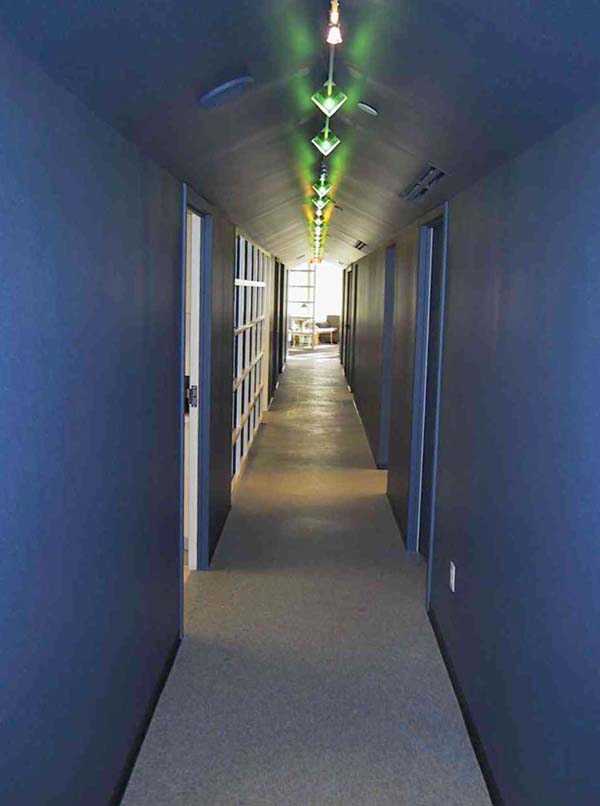
The first door on the left leads to the copy and supply area and the glassed grid area on the left leads to the kitchen and eating area. Doors on the right hand side of the tunnel lead to supply and file areas. Delivery Tunnel
A "Delivery Tunnel" permits outside deliveries of mail, packages and supplies to the Administrative Support and Copier room and Central Files room without disrupting workspace corridor traffic. The tunnel also leads to a kitchen and seating area for sit-down lunches and for the monthly birthday parties.
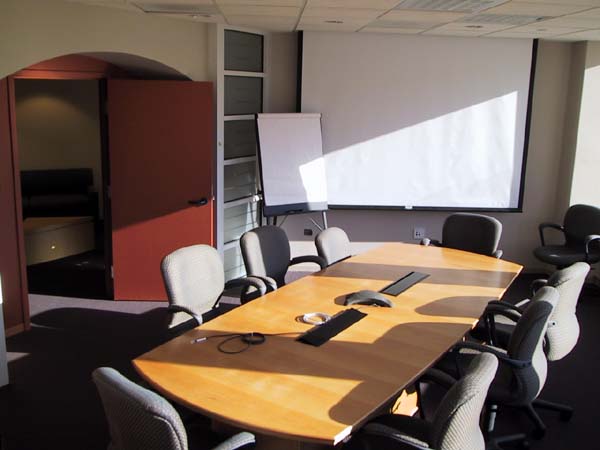
This is one of the conference rooms we use for clients and visitors. One slot in the table covers seven 10/100BaseT Ethernet ports connected to our LAN. The other slot covers two 4-plug power strips. Conference Room
There are three conference spaces for meetings and conference calls. The largest room can be subdivided with a built in, folding partition to create two rooms. Each conference room is equipped with 10/100BaseT Ethernet ports and power receptacles on sidewalls and in the floor.
What? You Use Macs?
Believe it or not, computers from the dark side are almost nonexistent at Blumenfeld & Cohen's, Washington, DC office. We have two PCs for the accounting department and a general utility PC for some other functions, which I will address later. All the other computers are Macs.
However, the San Francisco office, which is about a third of our size, only uses PCs and the OS from the Evil Empire. We installed our LAN and integrated with the Internet over a year ago. The San Francisco office is just now completing their LAN and their integration with the Internet. Could the reason be that they use PCs, Windows and a Windows NT server? One wonders...
With computers from the dark side so prevalent in most legal and business offices, how can Blumenfeld & Cohen's, Washington, DC office survive and even flourish with Macs? There are a number of reasons for this:
The two senior partners like and support Macs without any reservations, having experienced problems early on with PCs when the firm started, especially trying to multitask under early Windows versions.
We choose to use software that produces document file formats and functions that are interoperable between Macs and PCs.
A significant amount of our legal research is performed using a Web browser and that usually makes little difference whether used on a Mac or a PC.
The Macs require less cost and time to maintain and support than the PCs.
Macs have a number of functions not available on the PCs such as the Location Manager; critical to supporting attorneys on our LAN, on travel and at home.
The User Interface for the Finder and all applications is consistent when developers follow Apple's guidelines; Microsoft apparently does not follow guidelines because each application in the Microsoft Office suite uses different conventions.
The Macs, except for use of a two button mouse for Contextual Menus, are easier to use and more productive than the PCs.
The Macs have a longer useful life than the PCs. We still use some G3 accelerated Macs that were manufactured as long ago as five years.
There are other lesser reasons for our using Macs but the most important are listed above.
What Software Do You Use?
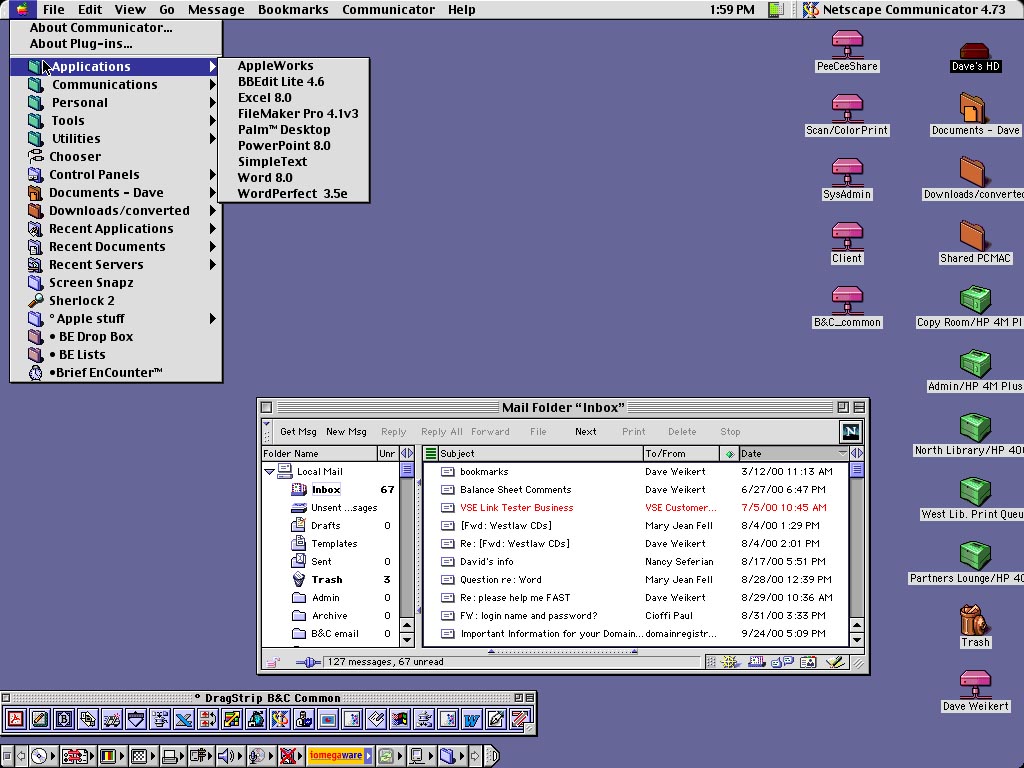
A screen capture of my Desktop. Note the accessibility of applications under the Apple menu in the upper left and the DragStrip along bottom left. The right side shows the mounted, shared folders (the ones with the "tail"), Desktop Printers, folders and hard disk.
Each Macintosh is running either Macintosh OS 8.6 or Macintosh OS 9.0.4 and is configured with a standard set of applications and utilities. The standardized configuration makes it easy to create a master disk image for installation on all computers. It also standardizes each computer so users and system administrators can operate any Mac without having to adjust for differences or fumble around to find something that they know should be installed.
Under the Apple Menu, we have created an Applications folder, a Communications folder, Utilities folder and an Apple Menu items folder that collects the Apple System Profiler, Calculator, Key Caps, Scrapbook and Stickies. The Chooser, Control Panels folder, Sherlock and Network Browser are all directly accessible under the Apple Menu and not in any folder. In addition, the use of leading spaces and the degree sign force the Menu items and folders into a preselected order.
The Applications folder contains aliases to AppleWorks, BBEdit Lite, Brief Encounter, FileMaker, Microsoft Office and Word Perfect.
Adobe Acrobat Reader, Mail Siphon II, Netscape Communicator, ZTerm and three specialized legal research applications, Premise, Westlaw and LEXIS/NEXUS, have aliases in the Communications folder. We use Netscape Communicator for e-mail rather than a dedicated client such as Eudora.
The Utility folder includes aliases to DropStuff, DragStrip, MacLink, GraphicConverter, Norton AntiVirus and Stuffit Expander.
Except for the Systems folder, the Apple folders are moved to a folder positioned at the bottom of the "list view windows" to reduce clutter. That includes the Apple Applications folder, the Internet folder, the Utilities folder and other Apple goodies.
The applications and utilities under the Apple Menu are duplicated on a single click Launch Bar. We use DragStrip rather than the Apple supplied Launcher to control icon size, bar position and application positions inside the strip. Some of our users prefer to use the Apple Menu to launch applications and some prefer the DragStrip so we provide both on all setups.
What Software Do You Use Most Often?
Our primary general office software is Microsoft Office 8.0. We use Word heavily, Excel moderately and PowerPoint occasionally. Any document we receive can either be read or modified in Word 8.0 or translated with MacLink into Word 8.0 documents. Since many other law offices use Microsoft Office on their PCs, the advantage of a compatible file format and function makes it easy on both them and us.
Brief Encounter is a legal time and expense recording program used in conjunction with Brief Accounting for billing clients. When connected to the LAN, Brief Encounter requests updated information such as labor category rates, matters (client jobs) from the Brief Accounting server and reports accumulated time and expense data. Brief Encounter can be used even when not connected to the LAN. Attorneys that are on travel can e-mail time and expense reports in a format that can be imported into the Brief Accounting server. Brief Encounter has a multi event timer so those attorneys can track how much time they spend on all matters. Obviously, Brief Encounter is used daily.
Netscape Communicator, often in conjunction with Acrobat Reader, is used daily for Web research and for e-mail. Premise, Westlaw and LEXIS/NEXUS are used by the attorneys and by the paralegal staff when performing research for the attorneys although the paralegal staff are using the Web-based versions more and more instead of the dedicated applications.
Mail Siphon II is particularly useful for our Road Warriors (attorneys on travel and limited to a dial up modem connection). Mail Siphon retrieves the titles and first 30 or so lines of all of the messages on the Mail Server. Since the mail is not downloaded but just displayed, the attorney can see what messages exist much more quickly than if they were downloaded. You can reply to any message seen in Mail Siphon and Mail Siphon also lets you delete mail you do not wish to download such as SPAM or UCE. Attorneys often send each other messages with large attachments (500 Kbytes to 2000 Kbytes). Try downloading a 2-Megabyte file over a 56K modem that often operates at much less than 56K and you can readily see the worth of Mail Siphon while on dial-up.
All Attorneys use Palm Organizers and the Palm Desktop application is installed on all Attorneys' Macs for daily use. The Palm Desktop application and Palm Organizer are synchronized so information entered in either is available on both. Support staff installations include Claris Organizer, which was used as the model by 3COM to program the Palm Desktop application.
All of the PowerBooks have multiple configurations controlled by the Macintosh OS Location Manager. These include a setup for each of the following:
TCP/IP for the office LAN with static IP address
TCP/IP for a generic LAN with DHCP
TCP/IP for home use with DSL or Cable
Remote Access and PPP dial up via modem for travel or home use.
The user selects the appropriate configuration during an early step in the OS startup. Try changing configurations in a reasonable time on a PC running Windows and it is immediately obvious why the Mac OS is superior.
The utility software most used is Stuffit Expander and MacLink.
What Else Do You Use?
BBEdit Lite, AppleWorks and FileMaker Pro are used only occasionally by only a few staff and by the System Administrators, who maintain a database, create drawings and clean up garbled text.
We sometimes receive Word Perfect documents, usually from government offices that are still using that legacy word processor. These documents are translated into Word format with MacLink or, if there are format problems, opened directly in Word Perfect which is installed on all Macs.
Since vandals don't seem to write too many dedicated viruses for Macs, Norton AntiVirus is mostly used to find and remove viruses that come with PC, Word and Excel files, most of which are enabled by the Microsoft macro function. To further protect the Macs, we operate Word and Excel with Microsoft Active-X and macros disabled. GraphicConverter is used occasionally but mostly by the System Administrators when an attorney needs a file converted.
When troubleshooting suspected directory problems, Apple's Disk First Aid is used as a prelude to running Disk Warrior, our primary tool for correcting damage. Norton Utilities (Disk Doctor and Speed Disk) and TechTool Pro are also used if required. The System Administrators also use programs such as Mac TCP Watcher or AG Net Tools for checking the network and Apple Profile Manager and Newer Gauge suite for checking computer configuration and performance.
VirtualPC with Windows 98 is installed on a few computers that need that capability. Virtual PC is required to execute a run time version of a program called RecordMate, which is programmed in Microsoft Access. We could run RecordMate on a PC but the users primarily need programs that are part of our standard Mac setup. Why buy two different computers when one with emulation works well. Besides, we are stubbornly Mac centric where there is no advantage to switch.
We ran a PC program called TABS (Time And Billing System) under SoftWindows in DOS Mode before our recent change to Brief Encounter. While TABS is an excellent program, and has been available in a Windows version for years, our Mac-centric users were very unhappy with the slower speed and inconvenience of running the program under emulation, and the even slower speed of the Windows version running under emulation.
To properly evaluate that Brief Encounter and TABS generated identical billing data, we planned to use both during an overlapping two-month changeover. Results were so good at the end of the first month that we decided to stop using TABS and SoftWindows immediately. Everybody in the firm is pleased with the change to Brief Encounter.
Tell Me about Your Computers
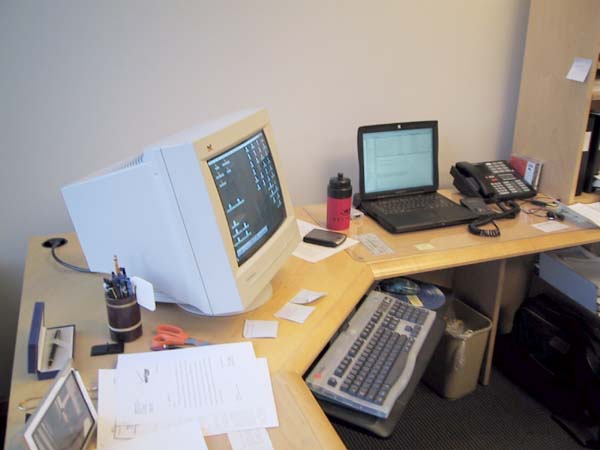
A docked PowerBook with monitor, keyboard and mouse. The Palm cradle, hub and USB drive were not connected at the time this picture was taken.
All attorneys have 1999 (Lombard) or 2000 (Pismo) PowerBook G3s equipped with 128 or 192 MB of RAM. They all have Bookendz docking stations on their desktops connected to a 17-inch monitor and a 4-port or 7-port USB hub that connects to a full size keyboard, a one or two button mouse, Palm Organizer cradle and external USB floppy or ZIP drives. The PowerBooks then become the primary computer for attorneys whether at their desks or on travel. This bypasses the problem of synchronizing desktop and laptop computers.
We also ordered our first 2001 Titanium PowerBook (Ti Book) with 500 MHz G4 processor and 256 MB RAM for delivery in March 2001. The larger screen size coupled with lighter weight lead us to believe that the Ti Book will be popular with our attorneys. A vendor has already announced they are designing a docking station for manufacture and all other necessary peripherals for docking already exist.
The Paralegal staff uses beige G3s with 128 MB of RAM although their G3s will be replaced with G4 Minitowers in March 2001. Our Office Administrator also uses a beige G3, which will be similarly replaced by a G4 Cube at the same time.
The remaining administrative support staff use PowerMac 7500s upgraded with a Newer (R.I.P.) G3 Accelerator Card. This gives a CPU speed somewhat faster than the beige G3s but the native PowerMac 7500 memory access and hard drive access are slower. Thus PowerMac 7500s are not quite as capable as our 266 MHz CPU G3s. Overall, the PowerMac 7500 computers perform quite well for four to five year old computers. We have had only two failures since they were purchased and that was a power switch on one and a CD ROM drive on another. However, the PowerMac 7500s, even with G3 Accelerator Cards, are reaching the limit of their usefulness. They mostly have 2-GB SCSI hard drives and many have less than ten-percent free space. SCSI drives cost more than ATA drives used in later computers. It is not attractive to replace the SCSI drives with larger ones considering the computers age and other limitations. We are eagerly waiting for Apple to release a low cost G4 Cube priced similarly to the middle iMac level or an iMac with a 17-inch monitor. If either happens, we will start to selectively replace the 7500s.
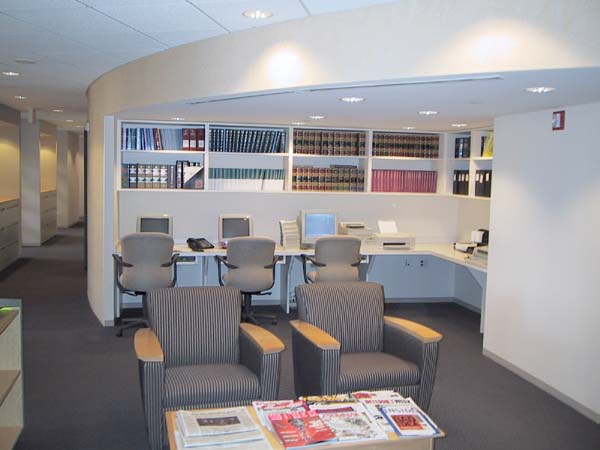
The Research Library includes reference material and computers that access the Internet. The PowerCenter Mac clone at the right side of the iMacs will be replaced by an iMac. Note the niche the research library computer area occupies formed by a cutout of the curvilinear interior wall. Our administrative assistant and the receptionist use iMacs. There are also two iMacs in the Research Library for use in research and an additional one is on order.
The Research Library
The two System Administrators have beige G3s and there are no current plans to replace either the System Administrators or the G3s ;-).
By the way, the accountings PCs manufactured by Compaq are called iPaqs and use the Windows 2000 Professional OS. These cute little buggers have the same Universal Serial Bus (USB) interface as recent Macintosh computers and no parallel or serial ports. They are much more cheaply made than the iMac and have nothing of the iMac style, however the accountants are happy to have them instead of their three year old PCs.
Star Wars Robot or iPaq?
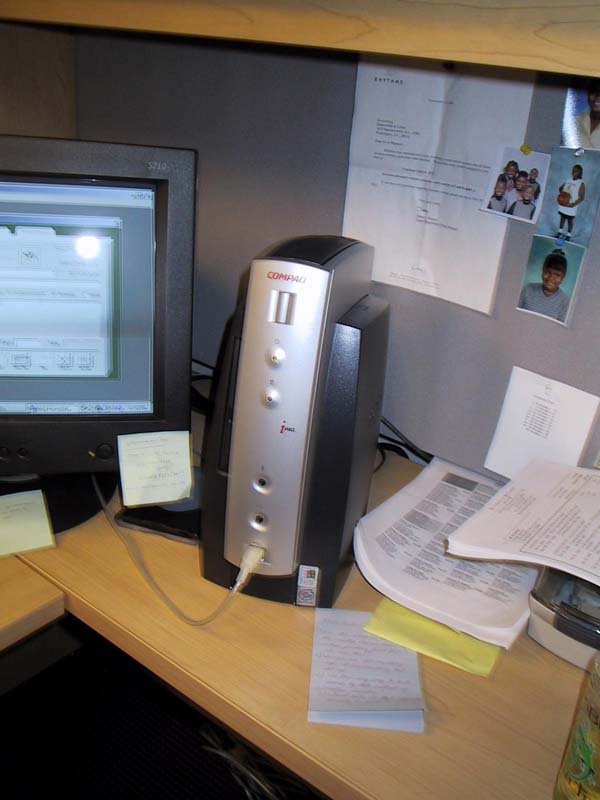
The iPaq and monitor with the silver and black motif, the only selection available.
We use a three-year-old PC running Windows 2000 Professional primarily for two things. It is useful for running .exe files that may for some reason not run well under VirtualPC. The PC is also imperative for translating mail that we sometimes receive in the Microsoft Outlook unique mail format instead of the "open standards" that Microsoft claims to support. Message in this format can be forwarded to a mailbox named "outlookrepair" and retrieved from the PC using Microsoft Outlook.
The LAN
Our office LAN is fully networked and connected to the Internet through a high speed DSL line from Rhythms NetConnections that is runs at 7.1 Megabits per second. Transfer rates on incoming mail are so fast, that our attorneys have observed that attachments often download faster than they can be opened by their applications. Our LAN is protected by a SonicWall Pro firewall similar to the one described by Lawrence Charters in a September/ October 1999 Journal article. Needless to say, we are protected from most attacks although a concentrated Denial of Service (DoS) could result from being bombarded from multiple computers simultaneously. The SonicWall log flags about 5 to 20 attempts a day to break into our LAN. To the best of my knowledge, none have been successful.
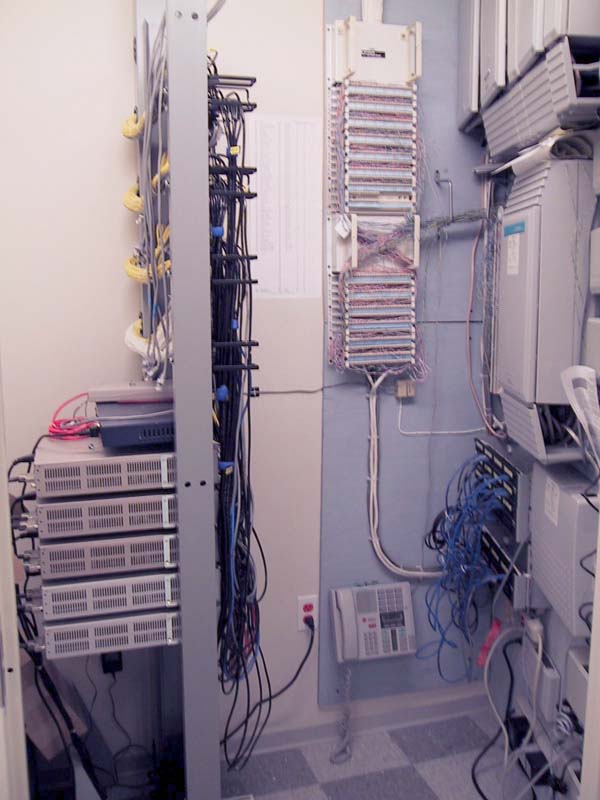
Obligatory network closet photo. The SonicWall also has a capability to do Virtual Private Networking (VPN). VPN opens a tunnel on the Internet and sends encoded data to another LAN that has VPN and has the correct password. Simply put, VPN works the same as having your own private Internet cable between two distant LANs. We will shortly link our Washington, DC and San Francisco offices with VPN so that we can directly exchange files, and print in each office from the other. Over time we expect to be able to do simultaneous document markup and video conferencing over the connection. Once linked, the San Francisco office can run their Brief Accounting client programs and access data from the Brief Accounting server in our office. The VPN interface between our LANs also permits update and reporting of Brief Encounter data from San Francisco with the Brief Accounting server.
Distribution of the LAN to individual offices is through 100BaseT Ethernet premise cables connected to five 24-port Bay Networks 10/100 auto sensing, auto negotiation switched hubs via patch panels. Each office has four jacks that permit flexibility of placement of the computers.
Six Hewlett Packard LaserJet printers (two -- 4MPlus, two -- 4000N and two -- 4050N) are accessible on the LAN from any Mac or PC. The printers are distributed around the primary corridor in dedicated print cubicles. The two LaserJet 4050N printers are addressed through a print queue running on the Blue and White G3 server. In addition to the networked printers, the Accounting iPaqs are each connected to a dedicated Brother 1250 Laser printer through a USB interface. The Brother 1250 Laser printers are located within each accountant's office to maintain control over sensitive information. We have a Color LaserJet 4550N on order for delivery in March 2001 along with a Hewlett Packard scanner with an Automatic Document Feeder (ADF).
Our Servers
We maintain a Blue and White G3 AppleShare IP (ASIP 6.2) file and print server which is backed up onto DDS 4 tapes every evening. Users are responsible for keeping files that they need to have backed up on their own folder on the server.
A beige G3 minitower hosts an SMTP mail server that processes only outgoing mail. We added this because our ISP outsources mail and the contractor limits attachment sizes to 5 MB. With our own server, we can send attachment without size limits.
The remaining server is another beige G3 minitower, which runs Brief Accounting, a law practice oriented, server based accounting system created by a small Canadian firm located in the suburbs of Vancouver. Brief Accounting is written in cross-platform Acius 4D server database and may be served on either Macs or PCs. The cross-platform Brief Accounting client software is also available for Macs and PCs. This is perfect for us because our two DC office accounting personnel have PCs, our Office Administrator has a Mac and the San Francisco office administrator/accountant has a PC. We have a single integrated accounting system but data elements such as clients and banks are different. However all of the differences are accommodated in the Brief Accounting server.
Two interesting side notes: The Brief Accounting and Brief Encounter developer, David Fisher-Fleming of Pan Pacific Professional, does all his development on Macs. He is also the original owner of a beautiful red MG TD roadster that looks immaculate. He flew down from Canada to install Brief Accounting and to teach our personnel how to use the program. It is unfortunate that Brief Accounting and its companion Brief Encounter are not better known as it is multi-platform and includes the functions of other PC only legal accounting systems. Brief Accounting information may be found at:
http://www.briefaccounting.com
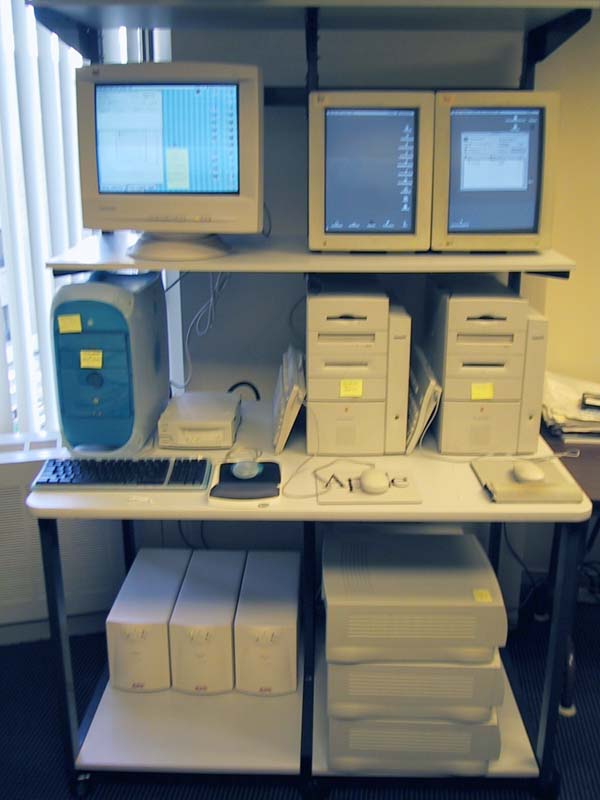
The servers are arrayed on a LAN workstation so they may be easily accessed. The LAN workstation has rollers so it may be moved away from the wall to access the backs of the servers. On the bottom shelf, left, there are three APC UPS units and, on the right, three unassigned 7500/G3s.
And, of course, the link to David's MG TD:
http://www.briefaccounting.com/mg/dff.htm
The servers are centrally located in the System Administrator's office where they are directly accessible for monitoring and update.
We contract for our POP mail with Cedant. We get 75 "free" mailboxes with the amount of disk storage we require. Cedant has recently added a Web-based mail function, which we are currently investigating. There is no extra charge for the Web-based mail but most of the attorneys' mail must be downloaded to their computers anyway so this may be of limited use except while on travel.
Blumenfeld & Cohen were one of the first dozen or so law firms with a Web site, on line since 1995. Periodic design changes have been made as Internet standards have evolved. We are currently updating our site content and design so you may find that the site has changed substantially if you have previously visited us. Stop by for a visit and an expanded description of our firm.
Cedant hosts our Web site at:
<http://technologylaw.com>.
The Cedant network connection provides a bandwidth-on-demand connection with Frontier Global Center, a Tier 1 provider servicing such giants as Yahoo! Netscape, and USA TODAY. Cedant is linked to FGC by a fiber optical cable -- making it unnecessary to link to the Internet through an OC3 or T3 Telecom circuit... no telecom circuit means that downtime-causing circuit failure is virtually eliminated!
Network and System Support
When I started with Blumenfeld & Cohen, about two and a half years ago, the DC office was about one-third the size it is now, networked with AppleTalk and interfaced to the Internet via dial-up modems. At first, I worked on a part-time basis just two days a week, approximately six hours a day. By summer of 1999, my workload had grown to about three, six-hour days per week as we added personnel. Although the AppleTalk network was inadequate for our needs, we knew that we would soon move to a new office that we could configure to our specifications. As the firm grew, we relocated to the new office in late fall 1999. As planned, our new location included an Ethernet LAN and a high speed dedicated connection to the Internet.
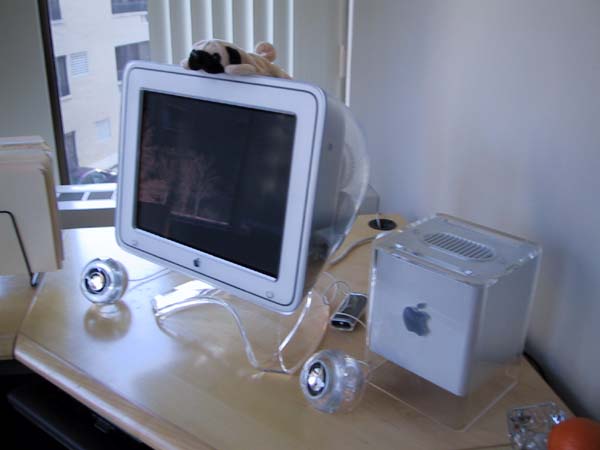
The watchdog on top of the G4 cube keeps careful track of any interlopers that may steal inside to pine over the Cube. By this past summer, with the increase in personnel and System Administrator functions, I was working about 7 hours a day for four days a week and often needing to catch up on the weekend. I had to drop most of my other business clients because of the demands on my time. As a result of the increased workload and added personnel, we hired a full time System Administrator in November of 2000. This new position allowed me to keep the job in the family. My son Mark and several other candidates were interviewed and Mark was ultimately hired for the position. (No, I did not interview or hire him. ...Really! ...Honest!)
Mark has a good knowledge of Macs and much of the software having previously been a part-time System Administrator and full time graphic designer at a firm that publishes weekly housing journals. The attorneys like Mark as he is patient and shows none of the ego that often occurs in a position where nobody else can perform your job. I am instructing him to the best of my limited ability on the mail servers, firewall and the like. He has made some innovations and enhancements such as using disk images and AppleScript to create standard installs and has made other improvements. Mark is instructing me on the finer points of graphics programs.
Epilogue
Since this article was written, we have taken delivery of the G4 Cube, G4 Minitowers, iMacs, HP Color LaserJet 4550N, HP scanner with ADF and UPS s. We expect delivery of the Ti PowerBook within the next few days. I could not resist adding one more picture, the G4 Cube which is now configured and in use.
The Author
Dave Weikert is a part-time System Administrator and Consultant to Blumenfeld & Cohen. Dave designs and configures networks and Macintosh computers and provides installation, operational and maintenance support. Dave agrees that he is a Mac bigot and avoids PCs whenever possible.
The majority of Dave's knowledge derives from working on the Washington Apple Pi TCS Crew with the experts such as Jon Thomason, Lawrence Charters, Rick Zeman and Lou Dunham. He also has been a regular service provider at the Tuesday night Macintosh Clinics.
Mark Weikert, full time System Administrator with Blumenfeld & Cohen took and processed the digital pictures and his wife Michele edited and helped rewrite the final drafts.
Note: Dave Weikert passed away in May 2001, shortly after this article appeared in print. He battled a serious illness for several years with courage, determination and ingenuity, unwilling to allow illness to place limitations on his interests and passions. A Washington Apple Pi member from the very beginning, more than two decades ago, Dave served at one time or another in almost all officer and volunteer positions, helping grow the Pi from a small band of clever fanatics to a very large band of clever fanatics.
Monday, September 22, 2008
The Jetson's
HPL Telepresence Network: Consulting | News | Public Availability
Gold Sponsors Silver Sponsors Bronze Sponsors Site Visitors Full Article: Law Firms, Legal Technology, and Telepresence - Teleconferencing Gets Ready for Prime Time
February 26, 2008 | Chris Payatagool
By Lindsay Thompson
Law Technology News
February 22, 2008
Ever since cartoon character Jane Jetson chatted away on her videophone in 1962, teleconferencing has been on the wish list of just about everybody. While the legal community has always been a prime target for this technology, past efforts have notoriously fallen short -- largely due to poor sound and mediocre visuals.
But finally, Web-based conference technology may be ready for prime time -- thanks to high-definition video and fast, fat "pipes." Advances in large-sized screens, effective systems integration and stronger bandwidth are driving a nascent market for high-end systems where remote participants appear almost to be real, present-in-the-flesh attendees.
Among the leaders in this new technology are San Jose-based Cisco Systems and Palo Alto's Hewlett-Packard.
Unveiled in 2006, Cisco's TelePresence system is designed to replicate the experience of an in-person meeting, offering nuances previously available only in face-to-face interaction. Participants are seen life-size, with clear audio and high-definition images, so that even the most subtle facial expressions and body language can be discerned -- critical factors for lawyers, especially litigators who must be expert in analyzing body language.
Cisco CTS 3000
For about $300,000, your firm can get TelePresence 3000, a conferencing suite that -- promises Cisco -- will pay for itself, as quickly as in one year, by way of reduced travel costs and improved logistics. And with an added bonus -- it can help your organization go "green." And if you don't need quite that much presence, you can buy TelePresence 1000, a one-screen, small-group version for about $80,000 per room.
Cisco's TelePresence systems include all the furniture, which hides a whole lot of technology inside the new cabinets and conference table: cameras and displays, lighting, speakers, microphones and projection technology. The system operates with H.264 video codecs, native 720p and 1080p high-definition cameras and encoding/decoding; wideband advanced audio coding with low delay; multichannel spatial audio with echo cancellation and interference filters to eliminate feedback from mobile devices, says Cisco.
TelePresence uses standard IP technology, and runs on an integrated voice, video and data network with broadband connections. There's IP telephony, and integration with enterprise groupware applications (i.e., Microsoft Office and Novell's Lotus Notes), allowing for scheduling, management, reporting, billing and metrics capture for tracking and billing.
The larger version offers three screens and can accommodate six people per site; the smaller is for a single office with one screen, where two people at a time can be projected and seen. Each room has a "hemispheric table that virtually connects to the table in the other room, to form a circular table," says Cisco spokesperson John Noh.
The system integrates with key firm software, including Microsoft Corp.'s Office suite, and Novell's Lotus Notes. That means, among other features, that users can schedule meetings through Outlook. Reaching a TelePresence studio, they press a phone pad button to make the call and start the meeting.
Cisco uses outside contractors, dubbed "advance technology partners," to manage build-outs. Those costs are part of the purchase price, via Cisco's service/support agreement. The telephony-based system has no monthly fees and its operating costs are comparable to that of a T-1 line, Cisco advises.
CISCO'S LEGAL TEAM
Mark Chandler, Cisco's senior vice president, secretary and general counsel, is -- as the saying goes -- eating his company's dog food. Chandler has enthusiastically embraced Cisco's TelePresence systems, and says their use has dramatically reduced his law department's national and international travel and meetings costs -- and carbon footprint.
Asked for an example of how the system could aid the legal industry, Chandler cites how, in April 2007, Motorola Inc., and Cisco's Scientific-Atlanta unit used the system to run a beauty contest between four firms to find a legal team for a Supreme Court argument. Stephen Shapiro of Chicago's Mayer Brown was chosen to argue Stoneridge Investment Partners, LLC v. Scientific-Atlanta et al., winning what The Wall Street Journal called "the biggest securities litigation case in a generation."
So far, Cisco has installed 171 TelePresence studios in its offices in "major global cities," says Chandler, including 121 in the U.S. and Canada -- a third of the installations using the smaller 1000 system.
They have been saving Cisco money to the tune of $80.68 million in avoided travel costs, he claims. Between the first build-out October 23, 2006 and January 15, 2008 the company held 62,415 meetings via TelePresence -- at an average meeting time of 75 minutes, says Chandler.
Cisco has invested about $1 billion in the new system -- which has been ramped up faster than any other past product rollout, he notes.
Chandler notes that the company has more than 100 patents pending on the technology, including feedback elimination when remote participants join a meeting, and bandwidth-use reduction (it transmits non-moving images once, refreshing them only if they change position.)
But the technology is still in only its infancy. Within a few years, Chandler predicts, Cisco will offer 360-degree virtual presence of remote participants.
TARGETING LEGAL
While Chandler is unabashedly excited about the potential for the legal market, the profession is -- as usual -- cautious about taking the plunge into the new technology. Major law firms have been slow to adopt the systems, Chandler acknowledges. So far, two AmLaw 200 firms have inked deals, and two more are in negotiation, he says, declining to identify them.
Consultant Bruce MacEwen, a former member of Law Technology News' Editorial Advisory Board, says he had a 45-minute TelePresence conference with Chandler several months ago, and was impressed. The experience, he says, was "scarily realistic. There's a reason they've nicknamed it internally at Cisco 'the holodeck,'" referring to Star Trek's simulated reality fields on starships. "Bottom line: revolutionary," MacEwen says. "If I were an airline executive, I'd be as worried about this as I am about $100-per-barrel oil."
Barbara Saidell, CIO of New York's Russell Reynolds Associates, an executive search and assessment firm, says her firm used TelePresence for a meeting between the company's London and New York offices, with several managing directors (partners). "It really is uncanny. It is a bit uncomfortable for a few minutes because the people on the other side of the table are life-sized and seem so real. After a few minutes you really do forget that it is video, and it becomes a real meeting."
Doug Caddell, CIO of Foley & Lardner and a member of LTN's Editorial Advisory Board, was also impressed during a demonstration, but remains guarded. "It is nice. But also nice and expensive, about $300,000 per location. Way too expensive for most law firms, especially if you have many locations."
But Chandler is undeterred. He enthusiastically predicts a 90 percent penetration into the legal market within three years.
In the meantime, Cisco is pursuing several market niches. Its main focus is on business and nonprofit entities with international reach. Wachovia Corp., BT, Rogers Communications Inc., Proctor & Gamble and SAP are among the corporate users already signed up, and Chandler sees a bright future in areas such as remote medical practice.
The Regus Group, which offers managed office space, has also added TelePresence to its offerings, bringing the technology to clients who don't need a full-time studio setup.
HP's HALO
Of course, Cisco's not alone in exploring new teleconferencing technologies. The most aggressive competitor may prove to be another Silicon Valley operation, Hewlett-Packard Co.
Like Cisco, HP offers two choices: one high-end and a second-tier option.
HP's Halo Collaboration Studio, which debuted in December 2005, is the more expensive model; the modular version for existing spaces is HP's Halo Collaboration Meeting Room.
HP Halo Meeting Room
Halo is drawn heavily on existing HP products and software. It includes three broadcast-quality cameras and lenses; four 60-inch plasma screens and a collaboration screen for visuals; a high-definition overhead object camera; an audio mixer; frame grabber; codec; scan converter; server; collaboration software; third-party device driver software; and an HCS connection user interface as its main operating systems.
Halo uses a dedicated fiber-optic network to provide a secure, closed system for Halo suites, to guarantees 45 megabits per second bandwidth all the time.
HP's client roster includes PepsiCo Inc., Advanced Micro Devices Inc., AIG Financial Products Corp., General Electric Co.'s commercial finance unit, ABN Ambro Bank N.V., Canon Inc. and Novartis AG.
HP's prices have been dropping steadily since Halo rolled out: from $550,000 to $349,000 today. The modular Collaboration Studio has a $249,000 price tag -- with an add-on Halo Gateway, developed with Tandberg, for interoperability with outside systems, for $39,999. HP provides 24/7 concierge support from a central support center for both versions, for a price tag of $18,000 a month.
SCALABILITY
HP Halo Marketing Manager Darren Podrabsky argues Halo's value is scalability. "Where Halo really is better is when you have four or more global locations. At that size the total cost of ownership comes out 20 to to 25 percent lower than the competition."
Podrabsky reports similar sales numbers to Cisco's: about 140 studios installed or contracted for, in 22 nations, with about 30 global accounts expected to be booked by the end of Q1 2008. He says HP is offering "extremely competitive" prices in major Pacific Rim cities in China, India and Australia.
Like Cisco, HP touts the savings of cash, time and environmental impact. An internal HP study over a one-year period found up to a 40 percent travel reduction in "certain sites" and a 30 percent offsetting increase in Halo Studio use, says Podrabsky. HP maintains if four people avoid a flight from New York to London and meet via Halo instead, the CO2 reduction is the equal of taking 360 cars off the road or planting 5,000 trees.
Halo's genesis was in a post-9/11/01 commission from DreamWorks chief Jeffrey Katzenberg, who asked HP to develop a superior videoconferencing system to reduce the increased challenges and costs of travel. Comedian Jerry Seinfeld and DreamWorks animators -- in Glendale and Palo Alto, California, and Bristol, England -- collaborated daily on "Bee Movie" using Halo; "Shrek 2" and "Shrek 3" developers and animators have made extensive use of the system since. DreamWorks' development participation has earned it an undisclosed royalty on sales of Halo systems.
So far Halo's core market penetration is in entertainment, pharma, financial services and oil & gas/natural resources companies. Big law firms and corporate law departments are a vertical market HP is interested in, says Podrabsky, "but so far we can't figure out what the issue is" in signing up clients. "I'd love to talk with law firm tech people to see how we can help them."
Though offering similar products, Cisco and HP are pursuing strikingly different business models. Cisco's TelePresence plays to its strength in networking. HP sees the future in managed services. HP's Podrabsky sees videoconferencing as a billion dollar market by 2010, but contends HP's concierge support operation has the potential to reach $10-12 billion.
Other companies eye the potential market for lower-cost systems:
* FedEx Kinko's offers videoconferencing services at 122 sites, and feature "easy-to-operate equipment, including a special camera to present charts and graphics, and voice-activated cameras to track action.
Users who already have videoconferencing equipment can use direct links to videoconferencing sites without incremental equipment costs, it says.
* Pleasanton, Calif.'s Polycom Inc.'s offers its TPX 360 HD 306M system, which accommodates six people. It also offers an "immersive telepresence" full-studio offering serving up to 28 participants; and high-definition systems for desktop and classroom use starting at $13,999.
Polycom TPX 360 HD 306M
Polycom's market thrust is principally integration with legacy systems for government, education and the medical industries.
* San Diego's Telanetix Inc. has inked a deal with Mercedes Benz-USA for a modular system using off-the-shelf components for $1,000 a month.
* New York's Teliris Ltd., an early entrant in HD teleconferencing, offers low-cost modular systems for companies not seeking to build out an exclusive facility.
Teliris Meeting Room
In an April 9, 2007 Popular Science review of Halo, author Robert Blum reminded readers that Robert Metcalfe (the inventor of ethernet) had formulated that "the value of a telecommunications network increases exponentially with the number of users in the network."
"It only took a decade for e-mail and cell phones to go from novelty to global ubiquity," observed Blum. "Once videoconferencing is as seamless as a phone call, our innate sociability will kick in and make it instinctive. Perhaps you already check your e-mail before work. Soon you may also pop into the office virtually before actually arriving."
That's part of the appeal Cisco's Mark Chandler sees for teleconferencing.
"We can't compress time," he says, "but if you have to get up at midnight for a teleconference, a good system is easier to manage than having to spend 24 hours on an airplane."
Lindsay Thompson is an attorney and freelance writer based in Port Angeles, Washington.
[via Law Technology News]
Return to telepresenceoptions.com > Telepresence News 10 September 2008
AT&T gears up for APAC telepresence space
9 September 2008
Telepresence Robot Deployed at the X PRIZE Foundation
9 September 2008
HSBC begins TelePresence rolloutPress Releases 10 September 2008
XO Communications Achieves Cisco TelePresence Connection Certification
10 September 2008
Glowpoint Awarded Multi-Year Telepresence VNOC Services Contract for Global Electric Energy Company
5 September 2008
HSBC Opens Global Network of Virtual Conferencing RoomsIndustry Calendar Link Exchange
Trying to understand the players in the emerging world of telepresence? Find them all in one convenient place, The Telepresence Options Link Exchange. Youtube Channel
See what happens when YouTube and the HPL come together at Telepresence Options YouTube Channel. HPL Whitepaper
Download the landmark HPL telepresence whitepaper here .
All Content/Code is covered by a Creative Commons License | Privacy Policy | Contact Us
Gold Sponsors Silver Sponsors Bronze Sponsors Site Visitors Full Article: Law Firms, Legal Technology, and Telepresence - Teleconferencing Gets Ready for Prime Time
February 26, 2008 | Chris Payatagool
By Lindsay Thompson
Law Technology News
February 22, 2008
Ever since cartoon character Jane Jetson chatted away on her videophone in 1962, teleconferencing has been on the wish list of just about everybody. While the legal community has always been a prime target for this technology, past efforts have notoriously fallen short -- largely due to poor sound and mediocre visuals.
But finally, Web-based conference technology may be ready for prime time -- thanks to high-definition video and fast, fat "pipes." Advances in large-sized screens, effective systems integration and stronger bandwidth are driving a nascent market for high-end systems where remote participants appear almost to be real, present-in-the-flesh attendees.
Among the leaders in this new technology are San Jose-based Cisco Systems and Palo Alto's Hewlett-Packard.
Unveiled in 2006, Cisco's TelePresence system is designed to replicate the experience of an in-person meeting, offering nuances previously available only in face-to-face interaction. Participants are seen life-size, with clear audio and high-definition images, so that even the most subtle facial expressions and body language can be discerned -- critical factors for lawyers, especially litigators who must be expert in analyzing body language.
Cisco CTS 3000
For about $300,000, your firm can get TelePresence 3000, a conferencing suite that -- promises Cisco -- will pay for itself, as quickly as in one year, by way of reduced travel costs and improved logistics. And with an added bonus -- it can help your organization go "green." And if you don't need quite that much presence, you can buy TelePresence 1000, a one-screen, small-group version for about $80,000 per room.
Cisco's TelePresence systems include all the furniture, which hides a whole lot of technology inside the new cabinets and conference table: cameras and displays, lighting, speakers, microphones and projection technology. The system operates with H.264 video codecs, native 720p and 1080p high-definition cameras and encoding/decoding; wideband advanced audio coding with low delay; multichannel spatial audio with echo cancellation and interference filters to eliminate feedback from mobile devices, says Cisco.
TelePresence uses standard IP technology, and runs on an integrated voice, video and data network with broadband connections. There's IP telephony, and integration with enterprise groupware applications (i.e., Microsoft Office and Novell's Lotus Notes), allowing for scheduling, management, reporting, billing and metrics capture for tracking and billing.
The larger version offers three screens and can accommodate six people per site; the smaller is for a single office with one screen, where two people at a time can be projected and seen. Each room has a "hemispheric table that virtually connects to the table in the other room, to form a circular table," says Cisco spokesperson John Noh.
The system integrates with key firm software, including Microsoft Corp.'s Office suite, and Novell's Lotus Notes. That means, among other features, that users can schedule meetings through Outlook. Reaching a TelePresence studio, they press a phone pad button to make the call and start the meeting.
Cisco uses outside contractors, dubbed "advance technology partners," to manage build-outs. Those costs are part of the purchase price, via Cisco's service/support agreement. The telephony-based system has no monthly fees and its operating costs are comparable to that of a T-1 line, Cisco advises.
CISCO'S LEGAL TEAM
Mark Chandler, Cisco's senior vice president, secretary and general counsel, is -- as the saying goes -- eating his company's dog food. Chandler has enthusiastically embraced Cisco's TelePresence systems, and says their use has dramatically reduced his law department's national and international travel and meetings costs -- and carbon footprint.
Asked for an example of how the system could aid the legal industry, Chandler cites how, in April 2007, Motorola Inc., and Cisco's Scientific-Atlanta unit used the system to run a beauty contest between four firms to find a legal team for a Supreme Court argument. Stephen Shapiro of Chicago's Mayer Brown was chosen to argue Stoneridge Investment Partners, LLC v. Scientific-Atlanta et al., winning what The Wall Street Journal called "the biggest securities litigation case in a generation."
So far, Cisco has installed 171 TelePresence studios in its offices in "major global cities," says Chandler, including 121 in the U.S. and Canada -- a third of the installations using the smaller 1000 system.
They have been saving Cisco money to the tune of $80.68 million in avoided travel costs, he claims. Between the first build-out October 23, 2006 and January 15, 2008 the company held 62,415 meetings via TelePresence -- at an average meeting time of 75 minutes, says Chandler.
Cisco has invested about $1 billion in the new system -- which has been ramped up faster than any other past product rollout, he notes.
Chandler notes that the company has more than 100 patents pending on the technology, including feedback elimination when remote participants join a meeting, and bandwidth-use reduction (it transmits non-moving images once, refreshing them only if they change position.)
But the technology is still in only its infancy. Within a few years, Chandler predicts, Cisco will offer 360-degree virtual presence of remote participants.
TARGETING LEGAL
While Chandler is unabashedly excited about the potential for the legal market, the profession is -- as usual -- cautious about taking the plunge into the new technology. Major law firms have been slow to adopt the systems, Chandler acknowledges. So far, two AmLaw 200 firms have inked deals, and two more are in negotiation, he says, declining to identify them.
Consultant Bruce MacEwen, a former member of Law Technology News' Editorial Advisory Board, says he had a 45-minute TelePresence conference with Chandler several months ago, and was impressed. The experience, he says, was "scarily realistic. There's a reason they've nicknamed it internally at Cisco 'the holodeck,'" referring to Star Trek's simulated reality fields on starships. "Bottom line: revolutionary," MacEwen says. "If I were an airline executive, I'd be as worried about this as I am about $100-per-barrel oil."
Barbara Saidell, CIO of New York's Russell Reynolds Associates, an executive search and assessment firm, says her firm used TelePresence for a meeting between the company's London and New York offices, with several managing directors (partners). "It really is uncanny. It is a bit uncomfortable for a few minutes because the people on the other side of the table are life-sized and seem so real. After a few minutes you really do forget that it is video, and it becomes a real meeting."
Doug Caddell, CIO of Foley & Lardner and a member of LTN's Editorial Advisory Board, was also impressed during a demonstration, but remains guarded. "It is nice. But also nice and expensive, about $300,000 per location. Way too expensive for most law firms, especially if you have many locations."
But Chandler is undeterred. He enthusiastically predicts a 90 percent penetration into the legal market within three years.
In the meantime, Cisco is pursuing several market niches. Its main focus is on business and nonprofit entities with international reach. Wachovia Corp., BT, Rogers Communications Inc., Proctor & Gamble and SAP are among the corporate users already signed up, and Chandler sees a bright future in areas such as remote medical practice.
The Regus Group, which offers managed office space, has also added TelePresence to its offerings, bringing the technology to clients who don't need a full-time studio setup.
HP's HALO
Of course, Cisco's not alone in exploring new teleconferencing technologies. The most aggressive competitor may prove to be another Silicon Valley operation, Hewlett-Packard Co.
Like Cisco, HP offers two choices: one high-end and a second-tier option.
HP's Halo Collaboration Studio, which debuted in December 2005, is the more expensive model; the modular version for existing spaces is HP's Halo Collaboration Meeting Room.
HP Halo Meeting Room
Halo is drawn heavily on existing HP products and software. It includes three broadcast-quality cameras and lenses; four 60-inch plasma screens and a collaboration screen for visuals; a high-definition overhead object camera; an audio mixer; frame grabber; codec; scan converter; server; collaboration software; third-party device driver software; and an HCS connection user interface as its main operating systems.
Halo uses a dedicated fiber-optic network to provide a secure, closed system for Halo suites, to guarantees 45 megabits per second bandwidth all the time.
HP's client roster includes PepsiCo Inc., Advanced Micro Devices Inc., AIG Financial Products Corp., General Electric Co.'s commercial finance unit, ABN Ambro Bank N.V., Canon Inc. and Novartis AG.
HP's prices have been dropping steadily since Halo rolled out: from $550,000 to $349,000 today. The modular Collaboration Studio has a $249,000 price tag -- with an add-on Halo Gateway, developed with Tandberg, for interoperability with outside systems, for $39,999. HP provides 24/7 concierge support from a central support center for both versions, for a price tag of $18,000 a month.
SCALABILITY
HP Halo Marketing Manager Darren Podrabsky argues Halo's value is scalability. "Where Halo really is better is when you have four or more global locations. At that size the total cost of ownership comes out 20 to to 25 percent lower than the competition."
Podrabsky reports similar sales numbers to Cisco's: about 140 studios installed or contracted for, in 22 nations, with about 30 global accounts expected to be booked by the end of Q1 2008. He says HP is offering "extremely competitive" prices in major Pacific Rim cities in China, India and Australia.
Like Cisco, HP touts the savings of cash, time and environmental impact. An internal HP study over a one-year period found up to a 40 percent travel reduction in "certain sites" and a 30 percent offsetting increase in Halo Studio use, says Podrabsky. HP maintains if four people avoid a flight from New York to London and meet via Halo instead, the CO2 reduction is the equal of taking 360 cars off the road or planting 5,000 trees.
Halo's genesis was in a post-9/11/01 commission from DreamWorks chief Jeffrey Katzenberg, who asked HP to develop a superior videoconferencing system to reduce the increased challenges and costs of travel. Comedian Jerry Seinfeld and DreamWorks animators -- in Glendale and Palo Alto, California, and Bristol, England -- collaborated daily on "Bee Movie" using Halo; "Shrek 2" and "Shrek 3" developers and animators have made extensive use of the system since. DreamWorks' development participation has earned it an undisclosed royalty on sales of Halo systems.
So far Halo's core market penetration is in entertainment, pharma, financial services and oil & gas/natural resources companies. Big law firms and corporate law departments are a vertical market HP is interested in, says Podrabsky, "but so far we can't figure out what the issue is" in signing up clients. "I'd love to talk with law firm tech people to see how we can help them."
Though offering similar products, Cisco and HP are pursuing strikingly different business models. Cisco's TelePresence plays to its strength in networking. HP sees the future in managed services. HP's Podrabsky sees videoconferencing as a billion dollar market by 2010, but contends HP's concierge support operation has the potential to reach $10-12 billion.
Other companies eye the potential market for lower-cost systems:
* FedEx Kinko's offers videoconferencing services at 122 sites, and feature "easy-to-operate equipment, including a special camera to present charts and graphics, and voice-activated cameras to track action.
Users who already have videoconferencing equipment can use direct links to videoconferencing sites without incremental equipment costs, it says.
* Pleasanton, Calif.'s Polycom Inc.'s offers its TPX 360 HD 306M system, which accommodates six people. It also offers an "immersive telepresence" full-studio offering serving up to 28 participants; and high-definition systems for desktop and classroom use starting at $13,999.
Polycom TPX 360 HD 306M
Polycom's market thrust is principally integration with legacy systems for government, education and the medical industries.
* San Diego's Telanetix Inc. has inked a deal with Mercedes Benz-USA for a modular system using off-the-shelf components for $1,000 a month.
* New York's Teliris Ltd., an early entrant in HD teleconferencing, offers low-cost modular systems for companies not seeking to build out an exclusive facility.
Teliris Meeting Room
In an April 9, 2007 Popular Science review of Halo, author Robert Blum reminded readers that Robert Metcalfe (the inventor of ethernet) had formulated that "the value of a telecommunications network increases exponentially with the number of users in the network."
"It only took a decade for e-mail and cell phones to go from novelty to global ubiquity," observed Blum. "Once videoconferencing is as seamless as a phone call, our innate sociability will kick in and make it instinctive. Perhaps you already check your e-mail before work. Soon you may also pop into the office virtually before actually arriving."
That's part of the appeal Cisco's Mark Chandler sees for teleconferencing.
"We can't compress time," he says, "but if you have to get up at midnight for a teleconference, a good system is easier to manage than having to spend 24 hours on an airplane."
Lindsay Thompson is an attorney and freelance writer based in Port Angeles, Washington.
[via Law Technology News]
Return to telepresenceoptions.com > Telepresence News 10 September 2008
AT&T gears up for APAC telepresence space
9 September 2008
Telepresence Robot Deployed at the X PRIZE Foundation
9 September 2008
HSBC begins TelePresence rolloutPress Releases 10 September 2008
XO Communications Achieves Cisco TelePresence Connection Certification
10 September 2008
Glowpoint Awarded Multi-Year Telepresence VNOC Services Contract for Global Electric Energy Company
5 September 2008
HSBC Opens Global Network of Virtual Conferencing RoomsIndustry Calendar Link Exchange
Trying to understand the players in the emerging world of telepresence? Find them all in one convenient place, The Telepresence Options Link Exchange. Youtube Channel
See what happens when YouTube and the HPL come together at Telepresence Options YouTube Channel. HPL Whitepaper
Download the landmark HPL telepresence whitepaper here .
All Content/Code is covered by a Creative Commons License | Privacy Policy | Contact Us
Wednesday, September 10, 2008
info needed
Hi everyone,
What does our posting have to be about, and how often do we have to post for extra credit?
Thanks
Tazegul Onal
What does our posting have to be about, and how often do we have to post for extra credit?
Thanks
Tazegul Onal
Monday, September 8, 2008
Subscribe to:
Comments (Atom)